
How can I determine the right class code for contractors?
Agents can select class codes using in-app tools during the submission process.
Starting Submissions
When starting a submission at Pathpoint, you can use Coverage Finder and the Search Tool to eliminate the guesswork of class code selection.
Select Contractors
Enter the business operations
Select the appropriate class code
The Class of Business page will be preselected

This video is hosted on YouTube and requires cookies to view.
YouTube Privacy PolicyClass of Business Page
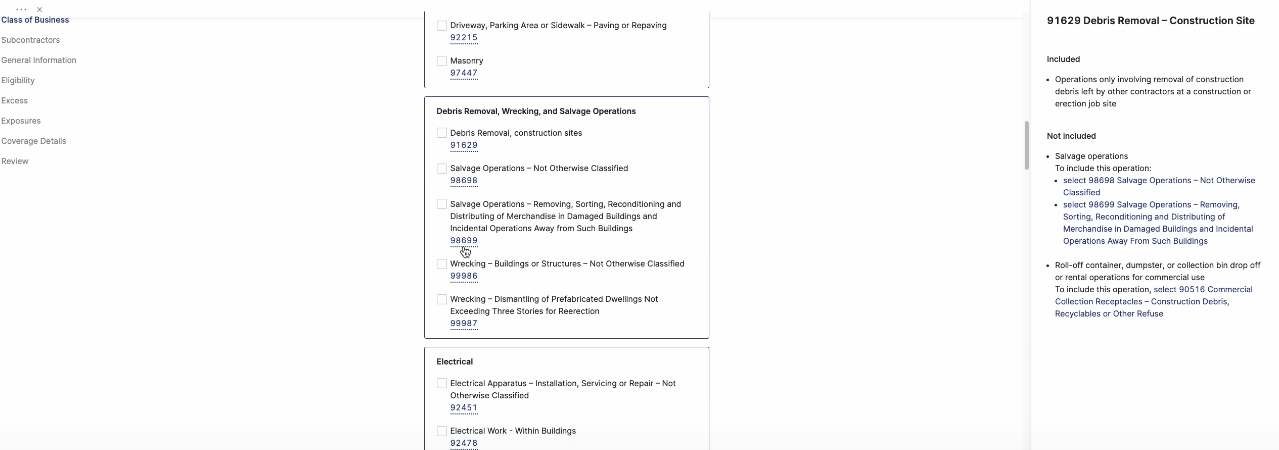
If you used the Search Tool, the class code will be preselected on the Class of Business page. If you skipped this option or want to change the class code, you can use the in-app Class Code Guidance feature.
Click the ISO class code link
A guidance panel will appear on the right, providing a detailed explanation of the class code.
You may also contact your Account Manager for assistance if you do not see the class code you are looking for within the quoting page. Please upload additional information for a faster quoting process.
Related Articles
What is Pathpoint's appetite for contractors?
How do I add multiple class codes?
Do you offer standalone excess liability?
Which endorsements are available with Pathpoint?