
How can I manage autopay or payment information for my clients?
Agencies can update, replace, or remove autopay settings and payment methods for insured clients directly through the Ascend portal. Below is a quick guide to help you handle common scenarios with confidence.
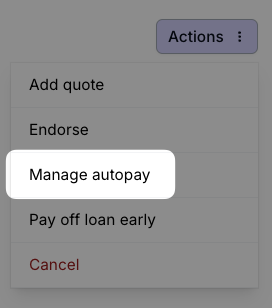
To Replace the Autopay Method
Log in to your Ascend portal.
Navigate to the insured’s policy and locate the upcoming installment payment.
In the Actions menu, select Manage Autopay.
Select Replace payment method and enter the updated payment details.
Save your changes.
To Remove Autopay
Log in to your Ascend portal.
Navigate to the insured’s policy and find the upcoming installment payment.
In the Actions menu, select Manage Autopay.
Select Remove autopay, then save your changes.
After removal, the policy will default to manual payments unless another method is added.
Important Tips
Timing matters: Changes should be made before the next scheduled payment to ensure they are processed on time.
After making changes, verify the update by checking the next scheduled installment in the policy details.
Make sure updates fully save by reviewing the refreshed autopay settings.
If you encounter issues or discrepancies, reach out to your Account Manager for support.
To learn more about Ascend's features, visit their website.